01
CURRENT WORKFLOW
A map of today's steps, people, tools and bottlenecks.
You know something in your process isn't working as well as it should. But is the answer a better way of organising the work, connecting your existing tools, or building something new?
The Workflow Systems Blueprint is a paid, focused engagement where I help you figure that out.
We'll take one recurring workflow, look at how it really operates, identify where time and clarity are being lost, and design a practical way forward.
You'll receive a Blueprint document with workflow diagrams and recommendations that we'll review together. It's something you can keep and use — whether or not you ask me to implement it.
WHAT YOU RECEIVE
A map of today's steps, people, tools and bottlenecks.
A design for clearer responsibilities, handoffs and approvals.
Recommendations, priorities and next steps if a Build is justified.
ONE RECURRING WORKFLOW SCOPE AND PRICE AGREED BEFORE PAYMENT NO OBLIGATION TO BUILD
You won't just leave with a conversation full of ideas. You'll receive a practical Blueprint document that shows how your workflow operates today, what needs to change and how to make those improvements happen.
A clear picture of your current workflow. We'll map how work moves between people, tools and decisions. You'll see where time is lost, which responsibilities are unclear and where repeated steps or fragile handoffs make things harder.
A design for a better way of working. I'll show how the same workflow could operate with clearer responsibilities, fewer unnecessary steps, better use of existing tools and automation where it genuinely helps. Important human decisions stay visible.
A practical path forward. You'll receive recommendations on what to keep, improve, connect or build, along with priorities, ways to measure success and a sensible implementation sequence.
We'll review the document together so you can ask questions and decide what happens next. The Blueprint is yours to keep and use, even if you don't build anything with FBDM Systems.
Maybe projects are being delivered, but every new one seems to involve the same chasing, checking and repeating.
Feedback arrives in several places. People aren't always sure which version is current. A simple approval creates another round of messages. And the person who knows how everything fits together becomes the person everyone depends on.
None of these problems necessarily requires new software. But when they keep happening, they quietly consume time, create risk and make it harder to take on more work.
That's when it's worth looking at the whole workflow — before deciding what to automate or build.
People spend time asking for decisions, confirming status or finding the latest feedback.
Files, messages, spreadsheets and tools all contain part of the information, but nobody has the complete picture.
Information gets copied, versions are prepared repeatedly, and someone has to remember the next step.
When someone is unavailable, the team struggles to understand what has happened or what should happen next.
A Blueprint is especially useful when these problems affect a process your team repeats regularly. For a one-off task or something a simple checklist can fix, a paid workflow redesign may not be necessary.
We won't begin by drawing an imaginary perfect process.
We'll take a recent example of work your team actually completed and follow what happened.
Where did the brief come from? Who picked it up? Where were the files stored? How did feedback arrive? Who approved the result? What happened when something changed?
We'll also look at the parts people tend to forget when describing their process: waiting, repeated checking, missing information, changed decisions and work that needs to be done again.
From that, I'll map how the workflow actually operates — including the people, tools, responsibilities and decisions involved.
The aim is to understand the work as it really happens, not how it's supposed to happen.
How the work arrives and what is needed to begin.
Where briefs, files, source material and information come from.
Who owns the work, what its current status is and who acts next.
How feedback, revisions, versions and human approvals are handled.
How approved material becomes the required outputs and formats.
What happens when work is published, handed over or completed.
What gets recorded, measured and carried into the next cycle.
It's tempting to assume that a frustrating process needs a new tool or a sophisticated automation.
Sometimes it does. Often, the better solution is much simpler.
Maybe the team needs clearer ownership. Maybe an existing application already has a feature nobody is using. Or perhaps two good tools need to exchange information so people can stop copying it manually.
The Blueprint helps separate the problems that need a process change from those that genuinely benefit from new technology.
The goal is not the most advanced solution. It's the simplest reliable approach that fits the work.
And throughout that decision, we consider what should happen automatically and what should remain in human hands.
A workflow can look simple when it's drawn as a sequence of boxes and arrows.
But those boxes don't explain who is responsible when something goes wrong, which version is safe to release, or what happens when one tool fails halfway through a task.
That's why the Blueprint goes beyond a picture of the ideal process.
The document identifies who owns important steps, how work moves forward and where human approval is required.
It highlights fragile handoffs, unnecessary repetition and situations where work could be lost, duplicated or left incomplete.
It explains which existing tools can stay, where connections or automation might help and what would need to be developed if a Build is justified.
It identifies which changes should happen first and what would indicate that the new process is working better.
Depending on the workflow, that might mean less manual coordination, shorter approval times, fewer errors, more reliable delivery or better visibility of current status.
You receive a plan that helps you make decisions — not just a diagram that looks good in a presentation.
You don't need to prepare a perfect process document before we start.
We'll work through one recurring workflow together, using real examples and the knowledge your team already has.
We'll define the workflow, what it needs to achieve and where its boundaries are. This keeps the engagement focused on a problem we can properly understand, rather than trying to redesign your entire business.
You'll show me how a recent piece of work moved from beginning to end. We'll look at the people, tools, files, decisions and handoffs involved, including the manual steps that don't appear in formal process descriptions.
I'll identify bottlenecks, repeated work, unclear responsibilities and risks. We'll distinguish genuine problems from steps that are necessary because of creative judgement, quality control or business requirements.
I'll prepare a proposed way of working, showing how responsibilities, approvals, information and tools should fit together. Where appropriate, this includes automation opportunities, integration requirements, operational safeguards and ways to measure improvement.
We'll go through the document together. You'll be able to ask questions, correct assumptions and understand the recommendations before the Blueprint is finalised.
Usually, the most useful starting point is someone who knows the workflow well and can walk me through a recent real example.
Existing briefs, spreadsheets, sample files, screenshots, forms or descriptions of the tools involved can help us understand the process. Other team members can contribute where their decisions or responsibilities matter.
We'll agree what information and access are actually needed, taking account of confidentiality, permissions and the scope of the engagement.
You don't need to arrive with the solution. That's part of what you're paying me to work out.
A process can look perfectly organised on a diagram and still become difficult to operate in real life.
I've encountered that while developing and operating Content Engine and Media Render Engine — systems that coordinate content sourcing, writing, editorial review, media production, human approvals, publishing and measurement.
They have to handle more than the ideal sequence of events.
What happens if an operation is accidentally triggered twice? If a task finishes but its result isn't recorded? If a file is approved for review but isn't ready for production? If something fails halfway through?
Those are real operational questions, and solving them has shaped how I design workflow systems.
It's why I look beyond the happy path when preparing a Blueprint. The plan should account for reliability, recovery, responsibilities and what happens when the unexpected occurs — not just how everything works on a good day.
Real dashboard views of operating status and scheduled publishing.
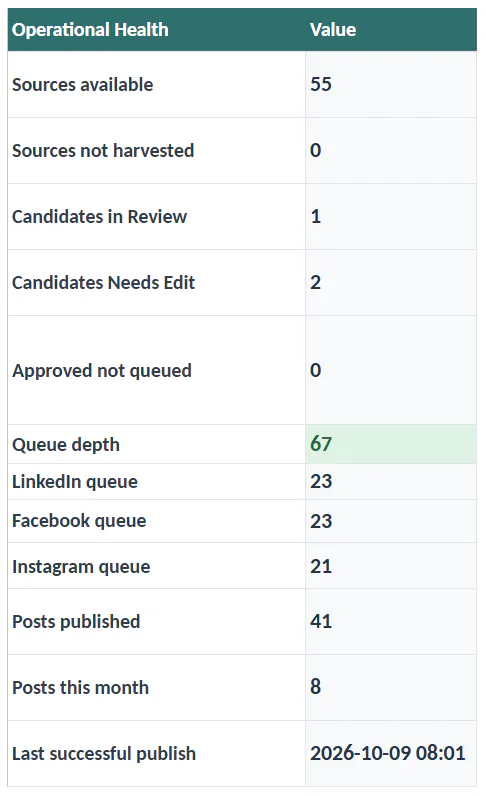
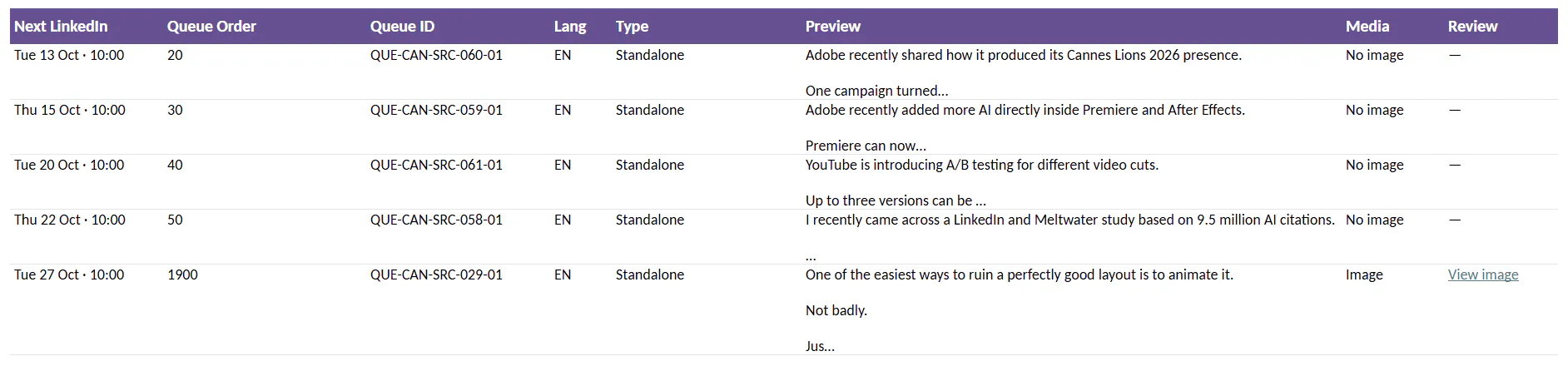
Once we've reviewed the document, you'll have a clearer understanding of the workflow and what improving it would involve.
There are several possible outcomes.
The paid Blueprint covers the agreed workflow diagnosis, design, documented recommendations and review.
It does not automatically include implementing automation, developing production software, changing your live systems or providing ongoing operational support.
It also isn't an unlimited consulting engagement or a company-wide technology transformation programme.
If you need work beyond the agreed scope, we can discuss and price that separately.
The Blueprint is a paid project with a tangible document as its main deliverable. We'll discuss your workflow and review the findings together, but the value isn't limited to those conversations. You'll receive a written plan, diagrams and recommendations you can return to and use.
The price depends on the agreed scope and complexity of the workflow. Tell me a little about the process you'd like to improve. I'll review the context and propose a defined scope and current price before any paid work begins.
That depends on the workflow, the information available and the people who need to contribute. We'll agree on the expected delivery schedule as part of the scope before starting.
No. You don't need to choose a tool or technical approach before the Blueprint. Understanding whether your existing software is enough, or whether something should be connected or built, is part of the work.
Yes. The document is intended to be valuable independently. You can use it to guide internal improvements, revisit the project later or discuss implementation with another provider.
Then that's the recommendation you'll receive. If clearer responsibilities, a better process or an existing tool will solve the problem, there's no reason to recommend a more complicated solution.
You don't need to know what the solution should look like.
Just tell me about one process your team repeats. What does it involve? Who needs to contribute? Where does it become frustrating, slow or difficult to manage?
I'll review what you've described and let you know whether a Workflow Systems Blueprint looks like the right next step.
If it does, we'll agree on the scope, price and expected delivery before any paid work begins.